If you're looking to download the date sheet for your specific course at the School of Open Learning (SOL), Delhi University, follow these step-by-step instructions:
Visit the Official Website:
Navigate to the official SOL, Delhi University website by going to https://www.exam.du.ac.in/.
Access the "Datesheet" Section:
On the left-hand side of the homepage, locate and click on the “Datesheet” tab.
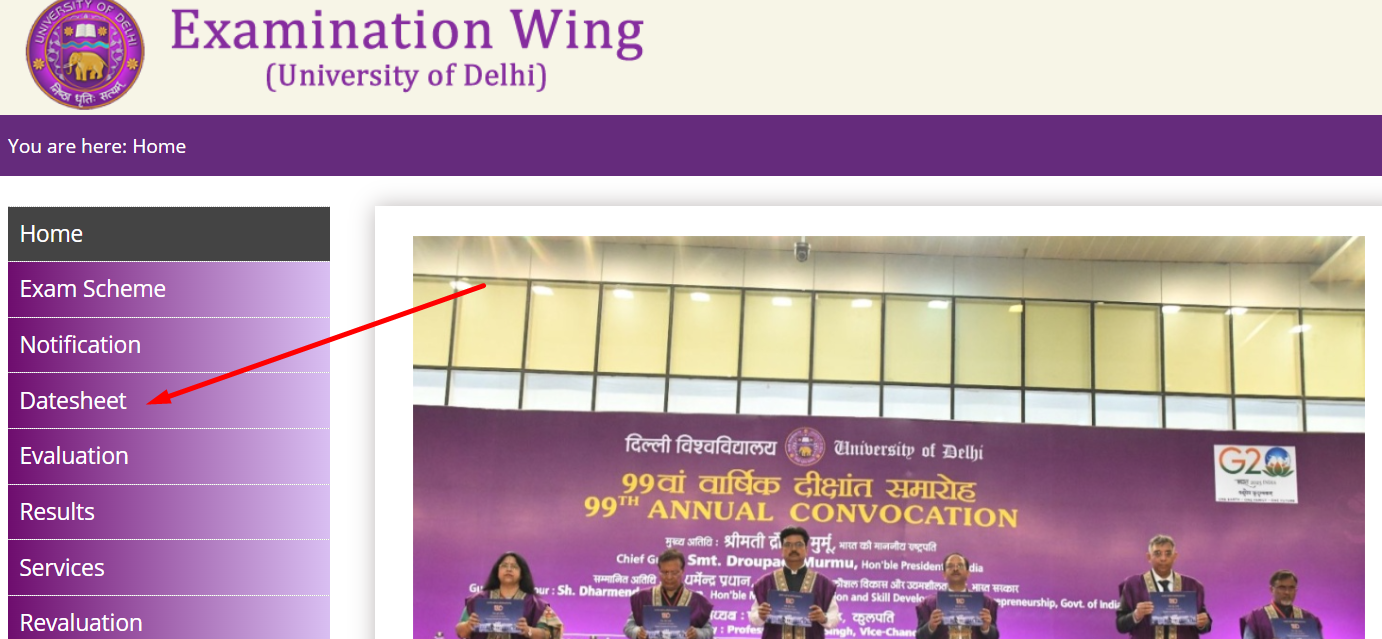
Select Your Semester and Admission Year:
Within the "Datesheet" section, choose your semester and admission year.
OR
Utilize the search bar on the right-hand side to directly type in your course.

Choose Your Course Wisely:
Be sure to carefully select your course program or honors.
Download Your Date Sheet:
Click on the specific course, and your date sheet for that particular course will be downloaded automatically.
Note:-Facing Issues? Contact SOL:
If you encounter any problems during the process, click on the “Contact Us” button located in the right section.
Feel free to reach out to the examination wing professors for assistance.
Stay Informed - Join Our WhatsApp Group:
To receive timely updates and information, consider joining our WhatsApp group.